Extrapolation Calculation
Market Milk Upload Process
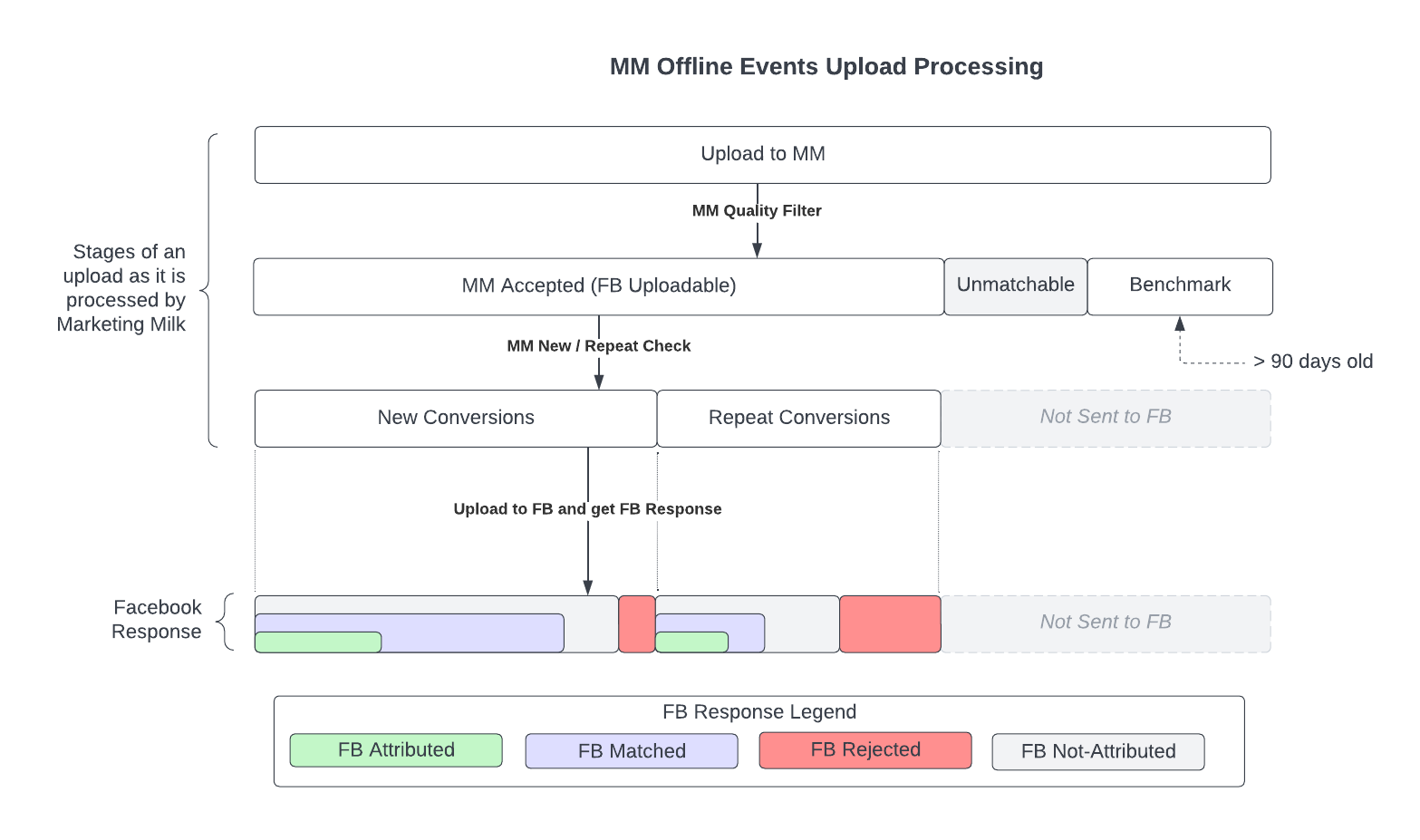 The anatomy of an upload as it is processed by Marketing Milk and then Facebook.
Upload to Marketing Milk
Let's say you upload 100 events to Marketing Milk. Before sending these events to Facebook we first process the events based on a set criteria dictated from Facebook. Let’s assume then that, following this processing, Marketing Milk found that of the 100 events uploaded, 20 event's event times are greater than 90 days old and cannot be sent to Facebook (i.e. they're benchmarked) and 10 events did not meet the minimum data criteria set by Facebook, which is needed to match events to profiles. This means that a total of 70 events are able to be uploaded to Facebook. As an additional note, of those 70 events Marketing Milk concluded that 50 of them are new conversions and 20 of them are repeat conversions. So before we send anything to Facebook, we have the following information...

MM Total Uploaded = 100
MM Accepted = 70
MM Accepted = 70
MM New Conversions = 50
MM Repeat Conversions = 20
MM Benchmarked = 20 (Events older than 90 days - not uploadable to FB)
MM Unmatchable = 10 (Events that did not meet the minimum data criteria set by Facebook, which is needed to match events to profiles)
Facebook Upload Stats
Once Facebook receives our upload, they process the events for quality and to deduplicate events. This means that the total number of events that Facebook processes may be fewer than the number of events Marketing Milk sent. After processing, FB tells MM how many events in the uploader were accepted.
As the exact nature of FBs processing is not shared with us, we do not know why some events are rejects from some uploads. However, we have verified this problem exists both 1) uploading directly to FB and 2) through MM.

Note: We, currently, are in contact with FB about this issue; however, as of publishing this article we still have no direction from them as to why this is happening and how to remedy it. We are also revisiting the extrapolation calculations and looking for ways to enhance it based off of an acceptance rate (i.e. those events Facebook did not accept).
By applying the formulas on this page, you can work out how an acceptance rate less than 100% affects the values on the dashboard. The MM team is actively working on making this easier to digest.
Let’s say that from querying Facebook for stats and insights for your uploaded events, we are told that Facebook accepted 60 of our 70 uploaded events and of those 60 events they accepted 50 were matched to a user profiles. From the 50 matched events and 60 accepted events we also calculate the match rate, which will be used later in the extrapolation (calculation for this is shown below). In total, of the 70 events Marketing Milk was able to send to Facebook, from your original upload of 100 events of those 70 events, we are given the following information:

MM Accepted = 70
FB Accepted = 60
FB Rejected = 10
FB Matched = 50
FB Unmatched = 10
Match Rate = Facebook Matched / Facebook Accepted = 50 / 60 = 83%
Facebook Attribution Stats
In addition to the upload stats, we also acquire, from Facebook, insight data into those user purchases from your upload that Facebook was able to directly attribute to the user having viewed or clicked on your ad. Let's assume, then, for your upload Facebook found that of the 50 events they were able to match to a user 25 of them could be attributed to having viewed your ad, and of the 25, 15 of them were NEW events and 10 were REPEAT events.
FB Total Attributed = 25 FB New Attributed = 15
FB Repeat Attributed = 10
Extrapolation Visual Process
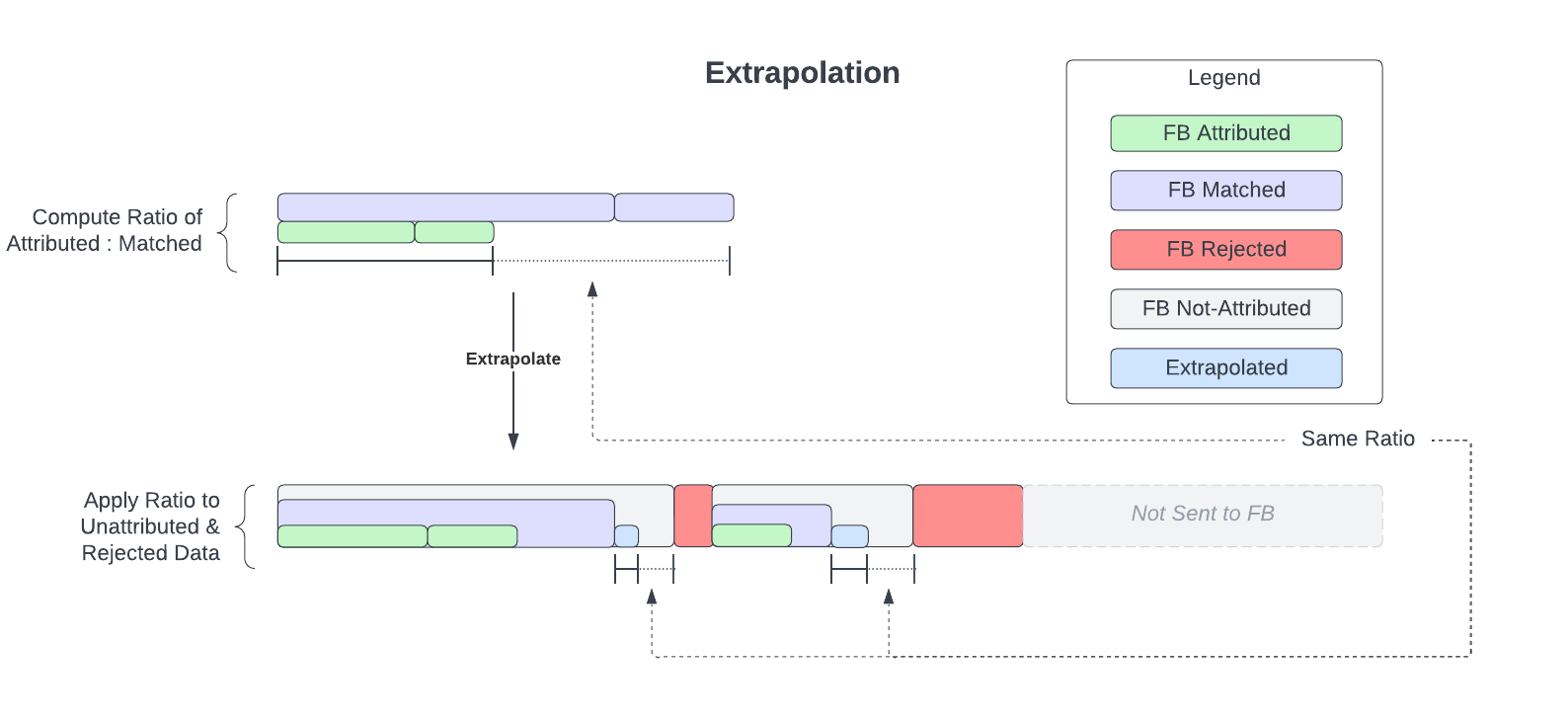 How Marketing Milk extrapolates from data Facebook was able to process to data that it wasn't able to process.
Extrapolation Calculations
With the information we acquired above we can estimate (i.e. extrapolate) how many more users would attribute to your ad campaigns if your match rate was 100% instead of 83% due to not being able to collect 100% of the customer information. The calculation for extrapolated data is broken down into 3 parts below.

The bold variables below are references to numbers we defined above. Those highlighted in red are items that will be referenced in subsequent calculations. The item highlighted in purple is the total extrapolation. ATTN: Marketing milk floors (rounds down) your total extrapolated results in order to not over estimate the total number of conversions that can exist for your upload.
NOTE: Marketing Milk will not extrapolate when the match rate is < 8%.
 You may notice that some calculations may be unnecessary when looking at a single upload, such as:
Matchable Conversions = MM Total Uploaded - MM Benchmarked - MM Unmatchable = 70 - 0 - 10 = 60
When you could just make the following assumption instead:
Matchable Conversions = FB Accepted = 60
This is due to the nature of extrapolation potentially spanning multiple uploads over a date range. We do not receive FB Accepted back from facebook at an event-level breakdown, but on the upload. Therefore we have to derive the value of Matchable Conversions using the formula, because MM Total Uploaded and MM Benchmarked are both saved at the event-level on our end.
You may notice that some calculations may be unnecessary when looking at a single upload, such as:
Matchable Conversions = MM Total Uploaded - MM Benchmarked - MM Unmatchable = 70 - 0 - 10 = 60
When you could just make the following assumption instead:
When you could just make the following assumption instead:
Matchable Conversions = FB Accepted = 60
This is due to the nature of extrapolation potentially spanning multiple uploads over a date range. We do not receive FB Accepted back from facebook at an event-level breakdown, but on the upload. Therefore we have to derive the value of Matchable Conversions using the formula, because MM Total Uploaded and MM Benchmarked are both saved at the event-level on our end.
1.) Extrapolate Unmatched Conversions
The first step we take in the calculations is on extrapolating your unmatchable items that Marketing Milk found when you first uploaded your events. In this case, it is the 10 unmatchable items that we want to extrapolate off of to see what we might have potentially had if those 10 additional unmatchable items were able to be uploaded to FB.
Matchable Conversions = MM Total Uploaded - MM Benchmarked - MM Unmatchable = 70 - 0 - 10 = 60
Unmatchable Attribution Rate = FB Total Attributed / (Matchable Conversions * Match Rate) = 25 / (60 * .83) = 0.50
Extrapolated Unmatched = MM Unmatchable * Unmatchable Attribution Rate = 10 * 0.50 = 5
2.) Extrapolate New and Repeat Conversions
The second step is to extrapolate on the unmatchable NEW and REPEAT conversions that Facebook wasn't able to attribute. With your upload we had 15 new and 10 repeat and we want to know what we might have had attributed to those if we perhaps had more accurate data tied to those events for Facebook to attribute.
NOTE: These values do not need to be calculated separately by new and repeat. You could follow the formulas below with new and repeat combined.
For instance:
Matched Conversions = MM Conversions * Match RateUnmatched = MM Conversions - Matched Conversions Attribution Rate = FB Attributed / Matched Conversions
Extrapolated = Unmatched * Attribution Rate
NOTE: These values do not need to be calculated separately by new and repeat. You could follow the formulas below with new and repeat combined.
For instance:
For instance:
Matched Conversions = MM Conversions * Match Rate
Unmatched = MM Conversions - Matched Conversions
Attribution Rate = FB Attributed / Matched Conversions
Extrapolated = Unmatched * Attribution Rate
Matched New Conversions = MM New Conversions * Match Rate = 50 * .83 = 41.5
Unmatched New = MM New Conversions - Matched New Conversions = 50 - 41.5 = 8.5
New Attribution Rate = FB New Attributed / Matched New Conversions = 15 / 41.5 = 0.36
Extrapolated New = Unmatched New * New Attribution Rate = 8.5 * 0.36 = 3.06
Matched Repeat Conversions = MM Repeat Conversions * Match Rate = 20 * .83 = 16.6
Unmatched Repeat = MM Repeat Conversions - Matched Repeat Conversions = 20 - 16.6 = 3.4
Repeat Attribution Rate = FB Repeat Attributed / Matched Repeat Conversions = 10 / 16.6 = 0.60
Extrapolated Repeat = Unmatched Repeat * Repeat Attribution Rate = 3.4 * 0.60 = 2.04
Unmatched Repeat = MM Repeat Conversions - Matched Repeat Conversions = 20 - 16.6 = 3.4
Repeat Attribution Rate = FB Repeat Attributed / Matched Repeat Conversions = 10 / 16.6 = 0.60
Extrapolated Repeat = Unmatched Repeat * Repeat Attribution Rate = 3.4 * 0.60 = 2.04
3.) Total Extrapolated Results
Finally, we take the previous steps and aggregate the results together. The initial attributed ratios is applied in order for us to evaluate whether the unmatched extrapolated items calculated in step 1 are new or repeat events. Otherwise, in this step we simply sum the Extrapolated New, Repeat and Unmatched events, which results in your total extrapolated events.
Attributed New Ratio = FB New Attributed / FB Total Attributed = 15 / 25 = 0.6
Attributed Repeat Ratio = FB Repeat Attributed / FB Total Attributed = 10 / 25 = 0.4
Extrapolated Unmatched New = Extrapolated Unmatched * Attributed New Ratio = 5 * 0.6 = 3
Attributed Repeat Ratio = FB Repeat Attributed / FB Total Attributed = 10 / 25 = 0.4
Extrapolated Unmatched New = Extrapolated Unmatched * Attributed New Ratio = 5 * 0.6 = 3
Extrapolated Unmatched Repeat = Extrapolated Unmatched * Attributed Repeat Ratio = 5 * 0.4 = 2
Total Extrapolated New = Extrapolated New + Extrapolated Unmatched New = 3.06 + 3 = 5.06
Total Extrapolated Repeat = Extrapolated Repeat + Extrapolated Unmatched Repeat = 2.04 + 2 = 4.04
Total Extrapolation = Total Extrapolated New + Total Extrapolated Repeat = 5.06 + 4.04 = 9.10 ~= 9
Total Extrapolated Repeat = Extrapolated Repeat + Extrapolated Unmatched Repeat = 2.04 + 2 = 4.04
Total Extrapolation = Total Extrapolated New + Total Extrapolated Repeat = 5.06 + 4.04 = 9.10 ~= 9
Related Articles
Extrapolation at the Campaign/Adset/Ad Level
Extrapolation at the Campaign/Adset/Ad Level Overview It might be noticed when perusing the Metrics table on the dashboard that Totals may not exactly line up on the Main Account-level dashboard as they might at the Campaign level. This issue ...Upload Data Attribution VS Dashboard Data Attribution
You may notice that the data on your client dashboard does not match the information shown on the Upload Overview Report. This can include Total Revenue/Purchases, New Revenue/Purchases, or Repeat Revenue/Purchases. Usually this is caused by either ...